Why use Facebook Graph search?
Facebook's Graph search allows
you to define a specific person or subject. It also has
some functionality that is unavailable in the current search
box. To enable
it, you may have to go into your Facebook settings and
set your interface language as "English (US)".
Click here to find Graph
search commands.

Graph does not work via the Facebook search box.
Instead you need to formulate a special web address looks like this:
http://facebook.com/search/facebook id/instruction
"Facebook ID" is a unique number for the
person or page that you are investigating.
For example, Mark Zuckerberg's Facebook ID is the number
4.
The "instruction" is a special command relating to that code.
For example "photos-liked" gives you a
list of the photos liked by the person. A Graph
search to reveal the photos liked by Mark Zuckerberg is:
http://facebook.com/search/4/photos-liked
To intersect two search subjects you
need to add /intersect to the end of the search web
address. For example, a search for photos liked and
commented on by Mark Zuckerberg:
http://facebook.com/search/4/photos-liked/4/photos-commented/intersect
Shortcuts
There are websites with search
forms that generate Graph search addresses, such as
graph.tips/beta and
netbootcamp.org
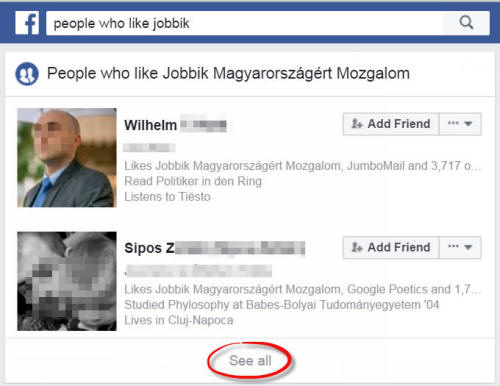
You can also sometimes launch a Graph
search off the back of a conventional search by clicking
"see all".
Finding
those Facebook ID codes
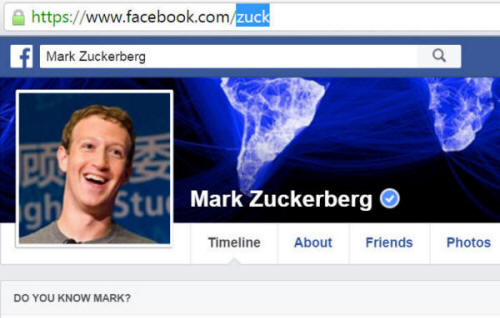
You can often find
a Facebook ID number in the web address of the person or
page you want to investigate. However, if there's a
name instead of a number, copy it and look up the number
using
findmyfbid.com

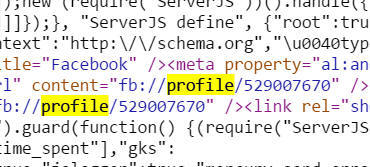
If this fails have a look for the ID
number in the HTML code. You can get to this via the browser by right-clicking on the profile, choosing "view
page source" and searching for the code that says
fb://profile or
if it's a subject page, look for code saying fb://page